Opendoor is now in Muse
Big home questions. Meet your new helper.


Ask Opendoor in Muse to explore your home value, selling options, and the cost of your next home.
No Opendoor account required.

For developers
Build with Opendoor’s MCP tools.
Streamable HTTP · No API key
Your agentOpendoor MCP8 public tools
Start with your home
Your home questions, answered.
From selling and buying to financing your next home, start with the question on your mind. Get an estimated value range, compare ways to sell, and explore what comes next.

One conversation, with room for your questions.
“What’s my house worth? Use Opendoor to find my property and get an estimated home-value range. Then help me compare listing my home with selling to Opendoor.”
Find and confirm your home address
Share your U.S. address. Opendoor finds the matching property, and you confirm it’s your home.
Get a home-value estimate
See an estimated value range based on today’s market, where data is available.
Explore your options
Compare listing with selling to Opendoor, or explore how your sale could help fund your next home.
An estimated home-value range is for planning, not an appraisal or an Opendoor offer.
Connect, then ask.
Use Opendoor’s public tools in your conversation with Muse.
Open Muse
Sign in to Muse and open Settings, then Connectors.
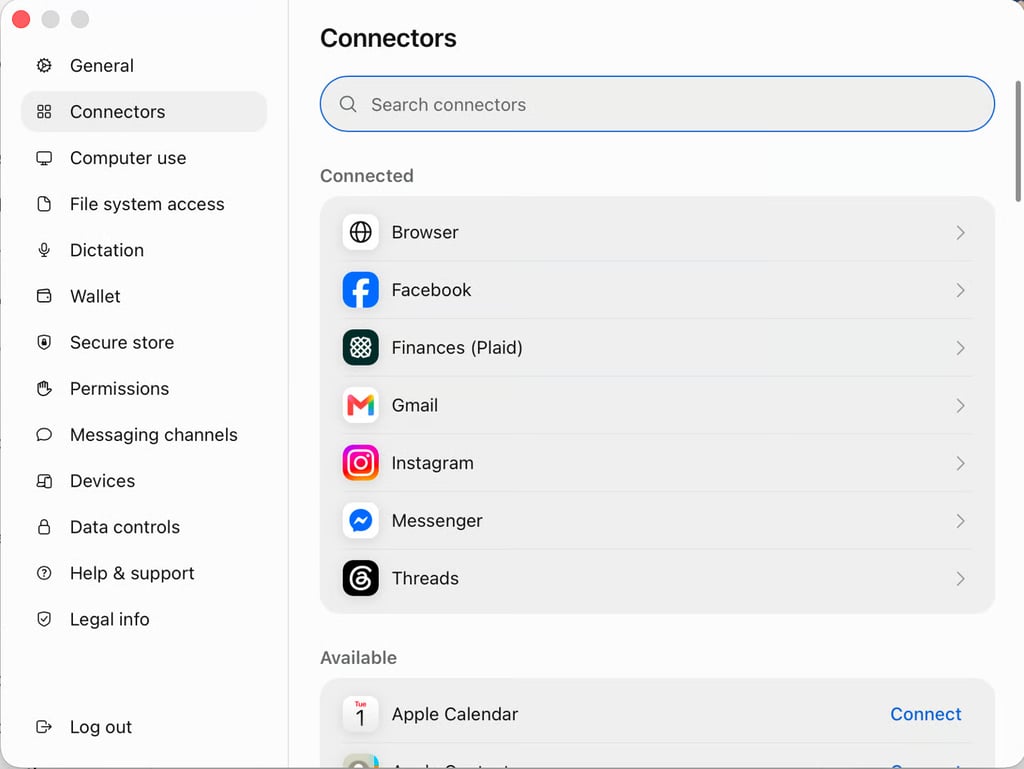
Muse Settings → Connectors Connect Opendoor
Find Opendoor and select Connect. You can also ask Muse to connect Opendoor.
Connectors
OpendoorAvailable
OpendoorConnectOpendoor row preview Start with your questions
Ask Muse to check Opendoor for your home value, options for selling and financing, and more.
Go ahead. Ask the big questions.
Copy a question into Muse.
What’s my home worth in today’s market?
An estimated value range for your confirmed home address.
What are the tradeoffs between listing and selling to Opendoor?
Estimated selling costs and take-home proceeds, side by side.
How much could I put down on my next home after I sell?
Your estimated sale proceeds after costs and mortgage payoff.
What would a $500,000 home cost me each month?
A monthly payment estimate using the loan details you share.
Estimates are for planning. They are not offers, appraisals, mortgage rate commitments, or loan approvals.
A few things to know
It connects Muse with Opendoor’s public planning tools. You can get an estimated home-value range, compare selling and moving scenarios, estimate mortgage rates and payments, and ask general questions about Opendoor. Muse is provided by Meta.
No Opendoor account, paid plan, API key, or OAuth sign-in is required for these public tools. You need access to Muse. Muse’s own access requirements and terms apply.
Open Muse and go to Settings, then Connectors. If Opendoor is listed for your account, select Connect, read the information, and continue. You can also ask Muse to connect Opendoor. If it is not listed, the connector may not yet be available in your account. See Meta’s connector guide for help.
No. An estimated home-value range is for planning. It is not an appraisal or an offer to buy your home. To request an Opendoor offer, start on Opendoor’s website. Your offer details provide the actual service charge, repair deductions, and other terms.
Provide the sale price or offer amount, mortgage payoff, and costs for each option. Keep traditional-listing costs separate from Opendoor costs. Include staging only in the listing scenario. If a material cost is missing, it stays unknown rather than being treated as zero. Hypothetical fee percentages are assumptions, not quoted Opendoor fees.
It depends on the inputs. Principal and interest use the loan amount, rate, and term. Taxes, insurance, and other costs require additional assumptions. Ask Muse to state what is included and excluded. Rate and payment estimates are for planning, not mortgage rate commitments or loan approvals.
Address-based tools support U.S. properties, and results depend on data coverage. Confirm the matching address before requesting a value estimate. Selling and moving calculations use the amounts and assumptions you provide.
The public tools do not access your Opendoor customer account or customer-specific records. A request can include a property address or financial assumptions when the tool needs them. Keep personal, property-specific, and financial details out of general Help questions. Do not send passwords, secrets, or unrelated personal information. Read the Opendoor Privacy Policy and Terms of Service. Muse’s own privacy controls and terms also apply.
Manage or disconnect Opendoor in Muse’s Settings under Connectors. Disconnecting stops new exchanges; information from past conversations can remain in Muse, so review its memory and conversation controls. For Opendoor product and process questions, visit the Opendoor Help Center. For connection and Muse questions, use Meta’s connector guide.
Ask about your home.
Then ask what’s next.
Start with the question on your mind. Opendoor is here to help, right in Muse.

For developers
Build with Opendoor’s public MCP tools.
Connect an MCP-compatible client to Opendoor’s public planning tools. This reference covers the endpoint, transport, tool catalog, access limits, data use, and support.
Connection
Send MCP requests by POST to this HTTPS endpoint:
https://ai.opendoor.com/api/mcp/muse- Connection type
- Existing MCP server
- Transport
- Streamable HTTP MCP over HTTPS; POST requests
- Authentication
- None for the listed public tools. No API key or OAuth.
- Account requirements
- No Opendoor account or paid plan required.
- OpenAPI specification
- Not applicable. Discover MCP tool input schemas with tools/list.
- Property coverage
- U.S. addresses, subject to available data.
- Request size
- Maximum request body: 64 KiB.
Request examples
Use Content-Type: application/json and accept application/json and text/event-stream. An MCP client handles initialization and protocol negotiation. These examples show the initialize and tools/list requests. The server is stateless and does not issue an MCP session ID.
Initialize the connection
curl 'https://ai.opendoor.com/api/mcp/muse' \
  -H 'Content-Type: application/json' \
  -H 'Accept: application/json, text/event-stream' \
--data '{"jsonrpc":"2.0","id":1,"method":"initialize","params":{"protocolVersion":"2025-06-18","capabilities":{},"clientInfo":{"name":"opendoor-example","version":"1.0.0"}}}'Discover tools and input schemas
curl 'https://ai.opendoor.com/api/mcp/muse' \
  -H 'Content-Type: application/json' \
  -H 'Accept: application/json, text/event-stream' \
--data '{"jsonrpc":"2.0","id":2,"method":"tools/list","params":{}}'Use the schemas returned by tools/list when sending tools/call requests. Do not substitute a property address for a confirmed address token.
Available tools
The eight public tools cover address confirmation, home values, selling and moving comparisons, mortgage estimates, and general Opendoor questions.
- help
- Answers general Opendoor product and how-to questions using the Help Center.
- resolve_address
- Finds matching U.S. property addresses for you to confirm.
- home_value
- Returns an estimated home-value range for a confirmed property, separate from an Opendoor offer.
- home_sale
- Estimates traditional-listing costs and what you could walk away with after selling.
- mortgage_rate
- Estimates a mortgage rate using the loan and borrower assumptions you provide.
- mortgage_payment
- Estimates a monthly payment using home price, down payment, interest rate, and any additional costs supplied.
- compare_move
- Compares how sale proceeds could fund your next home and estimates monthly costs at different purchase prices.
- compare_selling_options
- Compares a traditional listing with selling to Opendoor using separate costs for each option.
Address confirmation workflow
Call resolve_address with the user’s U.S. property address. Ask the user to confirm the matching property. Then call home_value with the returned addressToken and confirmed: true. If coverage is unavailable, ask whether the user wants to continue with their own explicitly labeled value assumptions.
Keep personal, property-specific, and financial details out of general help questions.
Limits and errors
The configured limit is 60 requests per minute per caller IP per server process. Callers sharing an egress IP can share a limit. HTTP 429 includes Retry-After; wait for that interval before retrying. HTTP 405 indicates an unsupported method (use POST). HTTP 413 indicates a request body larger than 64 KiB.
Data use and privacy
The server does not use an Opendoor customer account or retrieve customer-specific records. Requests can contain property addresses and user-supplied financial assumptions. Do not send secrets or unrelated personal information.
Intended use and estimate boundaries
Home values, sale proceeds, selling comparisons, mortgage rates, and mortgage payments are informational planning estimates. They are not purchase offers, appraisals, mortgage rate commitments, loan approvals, or financial advice. Actual Opendoor service charges and repair deductions come from the offer details.
Review inputs, default assumptions, and included costs for every tool. In compare_selling_options, missing material costs stay unknown, so do not rank incomplete results.
Support
For Opendoor product and process questions, visit the Opendoor Help Center. For Muse connection questions, use Meta’s connector guide. Developers reporting an integration issue should include the failing method and error code, with secrets and personal information removed.